Showing posts with label sem. Show all posts

Friday, April 10, 2009

High Impact Video - With a 5-Pound Sledge

Screen shot from the Charlie the Cheapskate video showing a 5-pound sledge hitting a piece of Wilsonart Laminate flooringVideo is a great way to tell a story. The combination of visual and audio elements can have a great effect on the viewer. I believe the more entertaining the video is, the more impact it will have and the more it will be remembered. Videos can be very effective, even if you’re reaching out to a niche market. A great example of using video to reach out is “Wilsonart Flooring and Charlie the Cheapskate” by Spike and Dave.

Spike tells the story: “I have been in the flooring business since 1993 and Dave (the salesman in the video) has been in flooring since 2000. Both of us attended the Wilsonart Training in Temple, Texas a few years ago, since then we have pushed to sell Wilsonart because of the quality and the difference between HPL (High-Pressure Laminate) & DPL (Direct-Pressure Laminate)[flooring]. We were asked … to come up with something that would show how we sell the Wilsonart Flooring.”

How the two sell flooring is apparent throughout the short video. They talk about low price versus value, especially considering how HPL resists stains, spills and damage. They even go so far as to drop a sledge hammer head onto a piece of HPL laminate flooring. According to Spike, this is something they really do, “When customers come into our store we use the sledgehammer as a visual to show the impact resistance of the [Wilsonart] floor.”

From a marketing perspective, the video incorporates important elements of a successful video, including the “Call to Action” at the end to visit Wilsonart Flooring’s web site. It’s all done in a short, to-the-point, but very entertaining segment. “As an advertising manager, I think it's important to have something that people don't forget... so we created 'Charlie the Cheapskate', a story of a man that would shop around at the Big Box stores to get the cheapest price on flooring, until he was educated from a professional, on why one floor is cheap and another is not,” said Spike. I believe he did it right as the video he created could be used as a training tool for sales people as well as a spot to educate customers the difference between different kinds of laminate flooring.

Check out the video and see for yourself. Does it give you ideas how to use video in your business either as a training or promotion tool?


Video credit: spikegilley

Monday, April 6, 2009

Demystifying Change Management

Hand with the word 'change' written on itSometimes, IT people will mention "Change Management" when discussing deadlines and schedules relating to the IT part of web site deployment. To some, this can conjure up visions of "Mordac the Preventer of Information Services" from the Dilbert comics. It's really not like that.


Change Management isn't some top secret bureaucratic plot to keep change from happening in IT. It's all about managing change. Think of it as an editorial board for IT stuff.

A Little History
When IT departments start out, they are usually small and agile. It's easy to make changes and coordinate those changes with the other person (or two) in the office so other systems or processes aren't adversely affected. As the departments grow, coordination becomes more complicated. At some point, changes are made in one system which cause another system to malfunction. It's not done intentionally nor out of incompetence; it's just that better coordination and accountability is needed to avoid problems.

This is where change management comes in.

In many organizations, here's how the process works:
  1. Someone, usually outside of the IT Department, requests changes to a process or application.
  2. The IT person(s) assigned to the project make the required change in a test system.
  3. The requester tests the changes in the test system. If the changes work properly, the acceptance is documented. Otherwise the process goes back to step 2.
  4. The changes are presented at a change management meeting. This is done to allow others to learn about the change and speak up if they believe the new change will adversely affect other systems.
  5. If there are no objections, the changes are approved in put into production on the "real" system. Otherwise, more testing is done to make sure no adverse affects will occur.
  6. The requester does a final test and acceptance is documented or the process goes back to step 2.
There is usually paperwork involved which is kept on hand for a predetermined period. In some organizations those documents are reviewed by auditors on an annual or semi-annual basis.

Testing is extremely important and probably the most important part to the Marketing people. When asked, test promptly and thoroughly and respond. This will make the process go much more smoothly and changes will get done more quickly. Having a formatlize procedure in place to document testing an acceptance is good for Marketing too, because it helps ensure things aren't rushed into place before they are ready.

Change management processes vary from organization to organization. Marketing folks: get with your IT counterparts and ask them about change management in your company and how you can help them get through the process more smoothly. What you learn will benefit everyone.

Image credit: apesara

Monday, March 30, 2009

Are You Showing Your True Value?

Young Children in a GroupIt's no secret that times are tough in today's corporate environments. It's more important than ever to demonstrate your worth to your employer to help keep you off the block if any cuts are made. One way to do this very well is by doing something we all should have learned in kindergarten: Play well with others.

A Non-Siege Mentality
When it comes to working on your corporate web sites, there is a lot of potential for empire building. Because IT people handle the technical end of things, put the site together and do the actual coding, they feel the web site is their baby. They sometimes resent someone telling them there might be a better way of doing things. The Marketing folks handle the "story" end of things, the design and the look. They often don't like being told "no" and don't understand why the IT people don't just do what they're told. Often times, both sides build a wall around their part and keep the other side out.

The truth is, though, that the web sites belong to the company. They are neither totally IT nor totally Marketing. In order to have the best web sites possible, it takes both groups coming together, combining their individual strengths to create the perfect storm of web site creation. Here are a few tips:

IT Folks: Explain why you can't do something or why it's not a good idea to do something. Often a simple reason can help the other side understand what's going on. Whenever possible, work up a compromise instead of a flat-out refusal. Unless what you're being asked for presents a real security problem or a technical nightmare there is, more often than not, a way to accomplish what the Marketing people want.
A group of men pushing a railway freight car

Marketing Folks: Help the IT people know and understand the story you are trying to tell. Be understanding when technical issues prevent doing exactly what you want and be willing to compromise. If you come from a print background, remember that web design doesn't work the same; sometimes you'll need to adjust a font or part of a layout because of the limitations of web browsers.

Check out my previous posts, "Geek-Speak for Marketers, Marketing Speak for IT" and "Who Owns The Web Site?" for other tips to get you started on a new era of cooperation. The biggest step to overcome is always the first - just get started!

When the time comes, don't be afraid to talk up the other group when it comes to sharing love at the end of a project. People appreciate it very much when you speak well of others instead of blowing your own horn. Promoting others always has a way of coming back to you in ways you never expect. Karma can be a wonderful thing.

Wednesday, March 25, 2009

How Are Your Digital Assets? - Stuff I Learned At PubCon South

At PubCom South in Austin, Brian Combs of Apogee Search, Amanda Watlington of Searching for Profit, Mike Grehan of Acronym Media and Jackie Bodine of Google made up an excellent panel entitled "Universal & Personal Search: This Changes Everything." I picked up quite a few ideas and action points from their presentations. Allow me to share some ideas with you.

Search Engine Results Pages (SERPS) have changed. No longer are there a few sponsored links on top, some to the side, then a list of "generic" or "natural" searches in a list taking up the main part of the page. Now there are links to images and videos with thumbnails to attract the eye along with "Shopping Results" and the "10-Pack" or "8-Pack" filling up the SERPS. If the searcher specifies a location in their search a number of links with a map image will also appear in the SERPS. All of those newer items sometimes crowd out the natural search results, which could bump your site down to the bottom of the first page or even to the second.

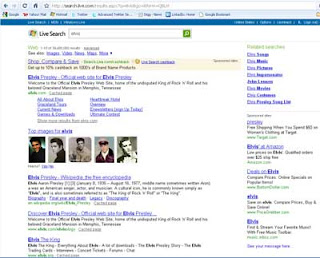
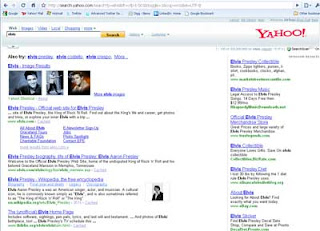
Because the human eye tends to focus on images first, SERPS with images will totally bust the traditional "Golden Triangle" or "Z" pattern of viewing as discovered in eye-tracking studies of the past. I'm going to use the example of searching for "Elvis" on Google, Live Search and Yahoo! to show how the images and video thumbnails look on SERPS which feature them. Click on the images below to see the actual web pages. Is your eye attracked to the images first? Mine were.

Google SERP on search for the word ELVIS

Live Search SERP on search for the word ELVIS


Yahoo! Search SERP on search for the word ELVIS
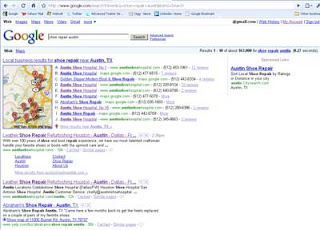
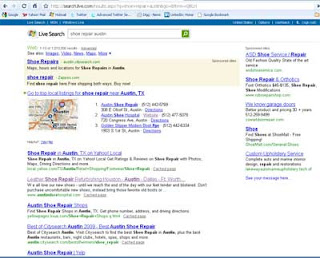
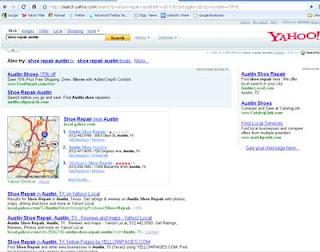
Here are some examples of SERPS where a location is included in the query. You can see how the map and "local" results change the SERPS:

Google search SERP on search for shoe repair in Austin, TX


Live search SERP on search for shoe repair in Austin, TX


Yahoo! search SERP on search for shoe repair in Austin, TX
Traditional web page only search optimization isn't going to cut it any more. If you have digital assets (in this case referring to images, videos and PDF files) they need to be optimized just like everything else on your web site. Here are some tips:
  • Inventory your digital assets so you know what you're working with.
  • Name digital files with a user-friendly, descriptive file name. "Chef Presentation of Banana Guacamole.jpg" is better than "img0900030233489a.jpg".
  • Optimize PDFs using the pieces in the "Description" tab in the properties box. I created a guide posted on our Intranet to help those in my company who create PDFs.
  • Create a video site map file for Google (http://www.google.com/support/webmasters/bin/answer.py?answer=80472&ctx=sibling).
Something to seriously consider is uploading your images to sites like Flickr and your videos to sites like YouTube. Even if you get your digital media files are indexed in Google, Yahoo! or Live image and video searches, you greatly increase your chances of people sharing and linking those files if they are on a site which specializes in such. Make sure to tag and describe the files thoroughly as well as make any copyright and trademark notices visible.

Videos need to have a call to action. It's good to set the profile the videos are uploaded to with a "Visit my website at www.mywebsite.com" message, but it's equally important to put that call to action somewhere in the video. This is because people can embed the videos into their own blogs or web pages, and they may not link to your site from their page. I think it's be a good idea to put the call to action at the beginning and the end of the video and at the bottom of each image.

The bottom line we must keep in mind is "Content is King." Content must be well-done, compelling and relevant to what your customers are searching for. All of the optimization is all for naught if you don't have good content.

Wednesday, March 18, 2009

Team Blogging - Stuff I Learned At PubCon South

Last week I attended PubCom South in Austin, Texas along with one of my marketing colleagues. It was a great, well-organized event put on by the folks at WebmasterWorld. I picked up quite a few good tips which I will share in a short series of posts.

Content is King
In the realm of SEM, one theme I've caught once and again at various events is that a well-optimized web site will have good, fresh, compelling and relevant content. One can optimize all day, but if the content is no good, the site still won't score well in search engine results pages (SERPs).

Fresh Content is Important
In my notes next to various ideas I picked up at PubCom I wrote "Blog" five times. At each occurance the word is circled and once I wrote three exclamation points behind it. Here's why:

An important point many PubCom presenters mentioned about web site content is that it needs to be fresh. Gone are the days when someone can create a great web site, post it and forget about it for a year or two (if those days ever really existed).

Not only does content need to be good when the site is first posted, but the content needs to be refreshed on a regular basis. This is especially true if you want visitors to come back to your site after their initial visit. Think about it: how many times will you visit a web site which isn't often updated?

Blogging is a very good way to get new content on your site on a regular basis. Before you start a blog, here are some things to consider:
  • Commitment. If you start a blog, you need to commit to posting. Opinions vary, but I think once per week should be the maximum interval between posts. If you're not going to be able to post at least once a week then you shouldn't start.
  • Your posts need to be relevent. If the purpose of your web site is to sell banana guacamole, then don't post articles about how to select a cell phone or what kind of shoes are in style this season.
  • SEO. Your blog posts should be optimized just like the rest of your site. If you have good, relevent content a lot of that work is done as you go.
I know what you may be thinking at this point: "I just don't have time to blog. The time commitment alone is enough to put me off the idea."

Catalan Climbers demonstrating teamwork
Team Blogging
If you're in a small shop and you feel this way, perhaps blogging won't work for you. At least not for now. But, if you're in a corporate shop and there are a number of people in your marketing, sales and IT departments, please allow me to introduce the concept of "Team Blogging."

Team blogging is simply this: get a group of people who can write some posts and make a schedule of who blogs when. If you go on a weekly update schedule and can gather a team of 6 people to blog you'll only have to post something once every six weeks. Is that do-able? For many it will be.

When gathering your team, don't forget to include those who perhaps can't write themselves, but would make a good interview subject. For instance, your CEO might not have time to write something on a regular basis, but is available for an interview every so often. Also, don't exclude those who can come up with good content but whose writing skills may need some polishing. Editing can be faster than writing something from scratch. In reality, the possibilities are limited only by your imagination.

Because people today want to hear from the real people who work for the companies they do business with, I don't recommend hiring a ghost writer to do blog postings. Although a tempting short cut, using ghost writers can backfire, especially when you take into consideration my last suggestion. Guest writers who are acknowledged as such don't fall into this category.

My last suggestion about blogs: Allow your visitors to comment freely. Your web site's visitors can also add relevant content to your blogs by commenting and asking questions. Of course, you (and the rest of your content-generating team) will need to respond. That will take some more time investment, but it's well worth the effort. (I know you might be thinking about it now, and I'll post suggestions on how to handle detractors and angry commenters in the near future).

Photo credit: Jurvetson

Tuesday, March 17, 2009

Who Owns The Web Site?

Standoff!I've heard it, seen it, felt it. Have you? At search marketing events around the world when corporate marketing and IT folks talk about their web efforts, you can't help but know it's there. It's tension so thick. It comes from the struggle between marketing and IT departments over control of the corporate web site.

At its core, I think this question comes down to ownership: who owns the web site? The simple answer is: both marketing and IT own the web site.

The History of It All
Ah, but if it were really so simple. Here's how I understand it works in many companies - your story may be similar:

Back in the day, someone in the Marketing Department saw what was going on with that "web thing" and realized the company needed a web site. Since web sites are hosted on servers, there's some computer networking and other "voodoo" involved it was decided that the IT Department should set up and run the web site. It made sense at the time.

Fast forward a few years later. Some marketing folks want to get an edge up on the competition and realize web marketing is a great tool in their arsenal of commercial warfare. One or two of them go to some conferences and learn about things like search engine optimization, search marketing, social media and other things. They come back full of ideas and want to make substantial changes to the web sites; to sharpen their swords, so to speak.

They run into a problem when they get back to the office and start trying to implement the changes. The problem comes from the IT folks thinking they "own" the web site. Whether it's because of a "territory" battle, change management procedures, adopted standards, or whatever they find the IT folks are reluctant to change things even though they acknowledge there is a benefit in making the changes.

Sound familiar?
It does to many. But it doesn't have to be this way.

So how do we change?
Obviously it's going to take some work and compromise on both sides. The team you build will be well worth the effort.

IT Folks - If there's one thing you can do to help the situation it's to listen:
  • Listen to what the marketing folks are trying to communicate without trying to figure out how at first. Learn the message. 
  • Find someone in the marketing department who's a little more tech-savvy than the others and ask them to help you learn more about what they do. 
  • Get yourself invited to meetings and learn what the marketing folks are trying to communicate. 
  • Take your marketing friend out to lunch and ask him/her questions about things you don't understand about the things discussed in the meetings. Listen for ways you can help them do their job better.
Marketing Folks - If there's one thing you can do to help the situation it's to ask:
  • Ask the people who work on the web team to attend meetings where you discuss your marketing plans. Let them sit in and later ask how their expertise might help you with those plans.
  • Ask about how easy it is for them to do "cool" stuff on the web site. I've found that many times things which marketing folks thing are difficult are quite easy and things which they think are easy are hard.
  • If you haven't done so already, ask the IT folks to show you around their area. Take the $0.50 tour and ask questions about things you don't understand.
  • Ask the web team folks out to lunch and get to know them better. Learn about their routines and daily challenges. Ask how you can help them do their job better.
Above all: learn each other's strengths and weaknesses. Good teams have members which learn about one another and learn how to set their strengths together to fill the gaps left by each other's weaknesses. They also better learn how to improve in weak areas and make each other stronger.

One last piece of advice: Next time Marketing sends someone to a search marketing conference, send one or two of the IT folks along. This will go a long way into getting everyone on the team working toward the same goals.